I wanted a Kubernetes lab where I could understand what happened before a node appeared in kubectl get nodes. That meant owning the virtual machines, the operating system preparation, and the cluster bootstrap myself. My setup runs six Debian VMs on two Proxmox hosts, with Terraform describing the machines and Ansible taking them through kubeadm.
The useful part of this project is the connection between those layers. A VM that boots successfully still needs a container runtime. A control plane that initializes still needs a stable API address. And three control plane VMs still share the fate of the two physical machines underneath them.
The hardware in my house
This is the physical setup behind the project: an HP ProDesk 400 G3, a Lenovo ThinkCentre, a Raspberry Pi 5, and a small TP-Link gigabit switch. The annotated photo below is from my own homelab. The two mini-PCs provide the Proxmox hosts; the Raspberry Pi is a separate machine in the lab, outside the six-node Kubernetes cluster described here.
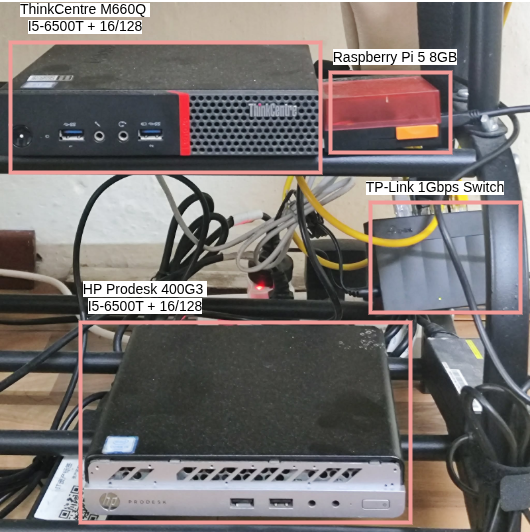
Each mini-PC is labeled with 16 GB of memory in the photo. That makes resource allocation a practical constraint: three 4 GiB guests on each host account for 12 GiB before the hypervisor and other overhead. Virtualization lets me separate control plane and worker roles on this hardware, but it does not give me six independent physical machines.
Starting with machines I can describe
The infrastructure repository uses the bpg/proxmox Terraform provider. It downloads a Debian 12 cloud image onto each Proxmox host, creates a template on each host, and makes full clones for the cluster nodes. The VM map carries the placement, CPU, memory, and network configuration, so those choices live in a file I can review.
Cloud-init gives each clone its hostname, an administrator account and SSH access, then installs and starts the QEMU guest agent. That leaves me with machines Ansible can reach, and gives Proxmox visibility into the guests. The current map assigns two virtual CPUs and 4 GiB of memory to each of the six nodes.
The connection between that map and the machines is small enough to show directly. These fields come from the VM resource in vms.tf:
for_each  = var.vms
node_name = each.value.n_name
vm_id     = each.value.id
name      = each.key
The map key becomes the guest name, while n_name chooses the physical Proxmox host and its local template. This keeps the guest's identity separate from where it runs. The same entry feeds the per-VM cloud-init snippet, so I do not have to rename a clone or repeat its network settings by hand after creating it.
I use three control plane nodes and three workers. The layout below follows the current Terraform configuration; it also explains the most important limitation of the lab.

Getting from Debian to Kubernetes
Ansible prepares the operating system before kubeadm runs. The preparation role disables swap, loads the networking modules, enables forwarding, and configures containerd with systemd cgroups. It pins the Kubernetes packages and the pause image explicitly, which makes the intended runtime configuration visible alongside the bootstrap code.
The control plane playbook installs kube-vip as a static pod, initializes the first control plane, and joins the other two using kubeadm's control plane join flow. A separate playbook prepares and joins the workers. Checks for the existing kubeadm configuration files guard the initialization and join steps; this is a useful boundary between preparing a machine and creating a new cluster on it.
One detail that matters during that sequence is the kubeconfig kube-vip uses. The initial manifest mounts super-admin.conf so kube-vip can participate in the first control plane's bootstrap. After initialization and joining, my post_processing role changes that mount to the standard admin.conf, which is available on the joined control planes. That small handoff is easy to miss when looking only at the final pod list. It follows the bootstrap distinction in the kube-vip static pod guide.
There is a similar ordering detail in the container runtime setup. Updating containerd's file is not enough if the daemon is still running with its old configuration. The preparation role explicitly flushes Ansible's restart handler before kubeadm starts, so initialization sees the configured cgroup driver and pause image. These are the kinds of dependencies I wanted the playbooks to capture.
When I checked the running cluster on September 13, 2026, all six nodes were Ready. They reported Kubernetes v1.30.14, Debian 12 and containerd 1.6.20. These versions describe this lab at that point in time. The detailed provisioning notes follow how the Terraform and Ansible pieces fit together.
One API address, two failure domains
The kubeadm configuration points at a virtual IP managed by kube-vip. Its static pods run on the control planes, using ARP and leader election to let one node own that address. When ownership changes, clients can keep using the same API endpoint.
The address is only one part of availability. This cluster uses stacked etcd: every control plane has a local member of the database that stores Kubernetes state. The three members need a majority to keep making progress, as described in the kubeadm topology documentation.
Two of my control planes live on pve. If that physical host fails, only one etcd member remains. Moving the virtual IP cannot recover the missing majority. Losing node1 instead leaves two control planes on pve, so the quorum calculation is different. Three virtual machines give me room to explore control plane failures, but the physical placement still matters.
That is the tradeoff I want the project to make clear. kube-vip keeps the API address simple without adding dedicated load balancer VMs. A third independent host would change the failure model; adding more VMs to the same two hosts would not. I go further into the distinction between API access and pod traffic in the networking notes.
Where the cluster hands over to Git
Cilium provides the cluster network, with VXLAN tunneling, kube-proxy replacement, and Hubble relay and UI enabled. Once the cluster is usable, Argo CD manages the platform configuration from a separate repository. This keeps VM provisioning and Kubernetes resource reconciliation in distinct places, each with a clear job.
The next project follows how Argo CD manages the lab. Its monitoring collector also connects the local cluster to my Google Cloud VPS, where VictoriaMetrics stores the samples and Grafana provides the dashboards. Those services make the lab part of a larger system I use and maintain.