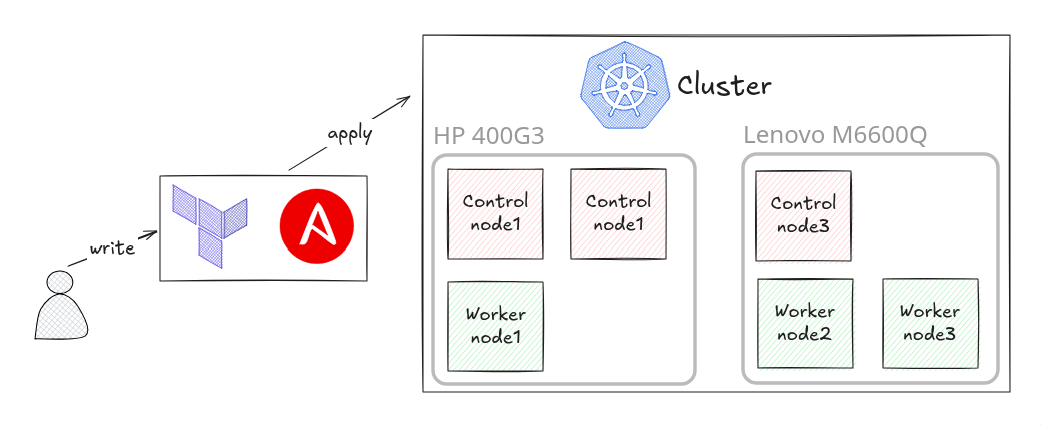
The cluster overview starts with six running nodes. This article follows the work that gets them there. I keep the virtual machine definitions and the Kubernetes bootstrap roles together in proxmox_bpg_infra, so I can follow a node from a Terraform map entry to a kubeadm join.
Templates belong to their hosts
In template.tf, Terraform downloads the Debian 12 cloud image onto each Proxmox host and creates a VM template there. vms.tf then makes a full clone on the host selected by that VM's n_name value. CPU, memory, VM ID, and network settings come from the map, while the bridge and storage choices are shared inputs.
Having a template on each host makes the placement explicit. My map puts control-1, control-2, and worker-2 on pve; control-0, worker-0, and worker-1 live on node1. Changing the map changes what Terraform is being asked to provision, so it deserves the same review as other infrastructure changes.
Cloud-init supplies the part that differs between clones. Each VM gets a hostname, an administrator's public SSH key, and the guest agent package. IPv4 and optional IPv6 settings are passed through the Proxmox initialization configuration. The private key remains outside this configuration.
I keep image preparation in template.tf, guest definitions in vms.tf, and per-guest bootstrap data in cloudconfig.tf. The full-clone setting gives each guest its own copy of the template disk. That uses storage on these small hosts, but makes the template's role straightforward: it is the starting image from which each VM is created.
The guest agent also crosses that boundary. Terraform enables the agent interface on the VM, while cloud-init installs and starts the actual agent inside Debian. Those are separate pieces of work. An enabled checkbox on the hypervisor cannot install a missing process in the guest, which is why the package and service startup belong in the bootstrap configuration.
Preparing the operating system first
The k8s_prep Ansible role handles the Linux requirements before any cluster initialization. It disables swap, loads overlay and br_netfilter, applies forwarding settings, and installs containerd. It writes containerd's configuration with systemd cgroups enabled and an explicit pause image, then flushes the restart handler before kubeadm runs.
Kubernetes versions come from ansible/group_vars/all.yml. The current roles install 1.30.14 packages and place kubelet, kubeadm, and kubectl on hold. That gives the bootstrap a defined version instead of letting an ordinary package upgrade silently choose it. The live nodes matched that version when checked in September 2026.
Bootstrapping the control planes
The control plane playbook runs preparation, kube-vip, initialization, and post-processing roles in order. kube-vip's manifest goes into /etc/kubernetes/manifests, where the kubelet can run it as a static pod. The kubeadm template uses the same virtual address for controlPlaneEndpoint.
The first control plane runs kubeadm init with certificate upload enabled. Ansible obtains the join command and certificate key and uses them to join the other control planes. It checks for admin.conf before initialization or joining, which avoids treating an already initialized control plane as a fresh one on a normal rerun.
Worker joining lives in its own playbook. The workers receive the same preparation role and join through the cluster API, without becoming etcd members. That gives me a clear split between adding control plane capacity and adding somewhere to schedule workloads.
I do not keep a captured join token in the playbook. The worker role asks the first control plane for a fresh command with kubeadm token create --print-join-command, using delegate_to and run_once. Each worker then executes that command only if /etc/kubernetes/kubelet.conf is absent. The token can change between runs while the check for an already joined worker remains local to that worker.
The role sequence in setup-control-plane.yaml makes the other dependencies visible:
roles:
  - k8s_prep
  - kube_vip
  - k8s_init
  - post_processing
The last role changes kube-vip's mounted kubeconfig from super-admin.conf to admin.conf after the bootstrap phase. Together with the early containerd restart, this is what makes the playbook more than a collection of installation commands: each phase leaves the files and runtime state the next phase expects.
The limits of the automation boundary
The kubeadm template declares both IPv4 and IPv6 pod and service ranges. That describes bootstrap intent; it does not by itself prove that every deployed network component is using both families. I verify the running Cilium configuration separately, in the networking article.
Likewise, provisioning the nodes is only the foundation. Argo CD and its root application need a usable cluster before they can reconcile the platform resources in the GitOps repository. Keeping those steps visible helps me understand what a rebuild still needs instead of calling the whole environment a single-command installation.